


AI Video Production Guide: From Creative Brief to Finished Film
Learn how to plan, generate, direct, and finish an AI video that feels intentional, on-brand, and ready for real audiences.
An AI video production project can begin with a simple prompt, but a strong finished film requires much more than a clever sentence typed into a generator. The best results come from a clear creative brief, a disciplined visual system, thoughtful iteration, and experienced post-production. AI can accelerate exploration and make new visual approaches possible, but it does not replace creative direction.
This AI video production guide breaks the process into a practical workflow for brands, agencies, and teams that want to use generative video without losing clarity, consistency, or craft. Whether the goal is a social reel, product launch film, campaign asset, music video, or experimental brand story, the same principle applies: start with the idea, then choose the technology that serves it.
What is AI video production?
AI video production combines generative tools with conventional creative and post-production practices. Depending on the project, AI may help with concept development, image creation, motion generation, visual variations, character or environment exploration, restoration, editing support, or finishing. The workflow can be entirely synthetic, or it can combine generated elements with live-action footage, archival media, animation, sound design, and traditional editorial.
The important distinction is between using AI to make more content and using AI to make a more effective piece of communication. A high-volume approach may be appropriate for testing social concepts. A brand film or launch campaign usually needs a more deliberate process in which every shot supports the message, audience, and identity.
Step 1: Define the creative brief before opening a tool
The first stage is not technical. It is strategic. Write a brief that answers five questions:
- What should the audience understand, feel, or do after watching?
- Who is the intended audience, and where will the video appear?
- What single idea should hold the piece together?
- What visual or verbal elements must remain consistent with the brand?
- What practical constraints matter, such as duration, aspect ratio, approvals, rights, or delivery date?
A useful brief is specific enough to guide decisions without prescribing every frame. “Make a futuristic video” is a directionless starting point. “Create a 30-second vertical film that makes a sustainable product feel tactile, optimistic, and desirable” gives the team something to build around.
The brief should also define success. For a product launch, success may mean explaining a new feature quickly. For a brand story, it may mean creating recognition and emotional memory. For a social asset, it may mean earning attention in the first two seconds and communicating without sound. Clear success criteria make the review process much more productive.
Step 2: Build a visual language
Generative video becomes difficult to control when every prompt introduces a new style. Before generating scenes, establish a visual language that describes the world of the film. Consider the colour palette, lighting, camera movement, lens feel, texture, composition, pace, typography, and relationship between foreground and background.
Reference frames or a small moodboard can help the team agree on the intended direction. It is often useful to create a few still images first, because they allow the creative team to test a character, product, location, or atmosphere before committing to motion. This is also where brand considerations should be addressed. A visual system can be bold and experimental while still feeling recognizably connected to the company it represents.
Consistency does not mean that every shot must look identical. It means that changes feel intentional. A documentary-style close-up, an abstract transition, and a wide product shot can belong to the same film when they share a coherent palette, lighting logic, rhythm, or emotional point of view.
Step 3: Turn the idea into a shot plan
A script describes what the video says. A shot plan describes what the audience will see and how the story will move. Break the concept into individual shots and give each one a job. The plan might include the subject, action, framing, camera movement, duration, transition, sound cue, and any text or graphic element.
This step prevents a common problem in generative production: collecting attractive clips that do not form a persuasive sequence. A shot can be visually impressive and still be unnecessary. The question is not only whether a clip looks good; it is whether it advances the story, clarifies the product, establishes an emotion, or creates a useful transition.
For short-form content, plan the opening carefully. The first moments need to establish visual interest and context quickly. For longer pieces, variation becomes more important: alternate scale, movement, pace, and visual density so that the film does not feel like a sequence of disconnected demonstrations.
Step 4: Generate in controlled passes
Once the shot plan is clear, generate in passes rather than attempting to create the entire film at once. Start by testing a small number of representative shots. Use those tests to refine the visual language, motion, framing, and level of realism before expanding the sequence.
Controlled passes make it easier to diagnose problems. If the subject changes between shots, the issue may be the reference system or prompt structure. If motion feels unnatural, the direction may need to be simplified. If the result looks polished but emotionally empty, the problem may be the concept rather than the tool.
Keep a record of prompts, references, settings, and selected outputs. This creates a repeatable process and helps the team return to a successful visual direction, and it is the foundation of a repeatable generative video workflow. It also makes revisions easier when a client wants a different product angle, a new aspect ratio, or an alternate ending.
Step 5: Use human direction to shape the result
Generative tools produce possibilities. Creative direction decides which possibilities belong in the film. Human judgment remains essential for performance, pacing, cultural context, brand fit, and emotional meaning. It is also necessary to identify details that may look acceptable at first glance but undermine the work when viewed closely.
A strong review asks several questions. Does the subject behave in a way that supports the story? Does the camera movement have a reason? Are hands, faces, text, products, and architectural details credible enough for the intended audience? Does the sequence communicate without relying on the novelty of AI? Does the film feel like one piece rather than a collection of experiments?
This is where a creative director, editor, or art director can create significant value. The goal is not to remove every unusual detail. Some imperfections can be expressive. The goal is to make sure the imperfections are chosen rather than accidental.
Step 6: Finish the film in post-production
Post-production is where individual generations become a finished communication asset. Editing establishes rhythm and hierarchy. Colour work creates cohesion across shots. Sound design adds weight, texture, and emotion. Titles, captions, logos, and motion graphics make the information legible and platform-ready.
Different delivery contexts require different finishing decisions. A vertical social video may need large captions and a faster opening. A product launch film may benefit from a more measured pace and a carefully timed reveal. A campaign may require multiple cutdowns, aspect ratios, language versions, and thumbnail frames. Plan these requirements early so that the master film can support the wider content system.
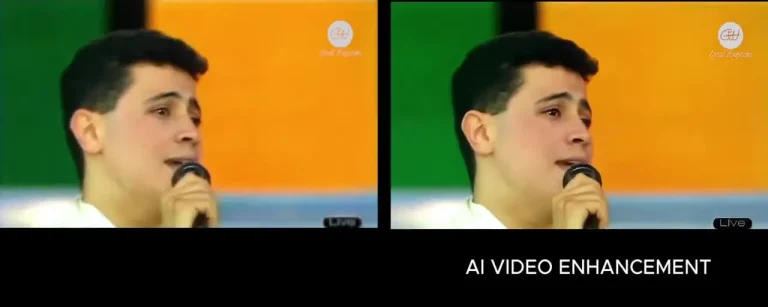
AI can also play a role in restoration and enhancement. Older footage, damaged archives, or faded photographs may be improved, upscaled, colourized, or integrated into a contemporary story. The creative decision is not simply whether the media can be restored; it is how restoration should serve the meaning of the piece.
Step 7: Review for rights, accuracy, and brand safety
Before delivery, review the work beyond its visual quality. Confirm that the project uses approved brand assets, licensed or authorized source material, and appropriate representations of people, products, and places. Check every title, caption, voiceover, product detail, and call to action for accuracy.
It is also worth documenting what was generated, what was supplied by the client, and what was altered in post-production. Clear project records help with future revisions and internal approvals. When a project involves a person’s likeness, voice, or identity, obtain the appropriate permissions and establish how the material may be used, for how long, and in which channels.
A practical AI video workflow at a glance
A repeatable workflow can be summarized as:
- Brief
- Visual language
- Shot plan
- Test generation
- Controlled production
- Editorial review
- Post-production
- Rights and quality review
- Delivery
The order matters. Skipping the brief usually creates inconsistency. Skipping the shot plan creates beautiful but disconnected footage. Skipping post-production leaves the result feeling unfinished. The workflow is flexible, but each stage should have a clear purpose and decision-maker.
How Hip House can help
Hip House combines AI tools with creative direction across AI image generation, AI video generation, and video and image restoration. Its AI Media Production service is designed for projects such as brand films, social reels, ad campaigns, music videos, product launches, archival restoration, and product visualization.
For teams that need more than a single asset, Hip House also offers AI Strategy & Automation, AI Training & Workshops, and AI Identity & Digital Twins. That broader perspective can help connect production decisions to a longer-term AI video marketing strategy, internal capability, or brand identity.
The right next step depends on the brief. If you have a campaign, product story, archive, or ambitious visual concept in mind, you can start a project with Hip House.
Frequently asked questions
AI video can support many brand categories, but the best approach depends on the audience, message, risk tolerance, and desired visual language. Some projects benefit from a fully generated world; others are stronger when AI is used selectively alongside live action, design, or archival material.
The timeline depends on the scope, number of shots, level of iteration, approvals, finishing requirements, and delivery formats. A short test concept can move quickly, while a multi-version campaign or high-control brand film needs more planning and review.
Consistency is possible, but it should be designed into the workflow through references, visual rules, controlled generation, selection, and post-production. A shot plan and clear visual language are usually more important than simply using more prompts.
Helpful inputs include the objective, audience, key message, brand guidelines, references, required deliverables, deadlines, approved assets, and any legal or usage constraints. The more clearly the project is framed, the more effectively the creative team can explore.
Conclusion
AI video production works best when it is treated as a creative discipline rather than a shortcut. The technology can expand the range of visual ideas, accelerate iteration, and make new forms of storytelling possible. The finished work still depends on the fundamentals: a clear brief, a strong concept, intentional direction, careful editing, and a commitment to quality.
Use this AI video production guide as a starting framework, then adapt it to the needs of your audience, brand, and channel. When the idea matters, the workflow should make the idea clearer—not disappear behind the novelty of the tool.
AI Media Production
Cinematic visuals. Generative video. Restored masterpieces. All powered by AI. All guided by creative directors.